WAF
The Web Application Firewall (WAF) interface allows OpenPanel users to toggle Coraza WAF on or off for each domain individually.

Manage domain
Clicking a domain name opens the rule management page where you can disable individual rules for that domain.

Rules can be disabled by ID (SecRuleRemoveById):

Or by tag name (SecRuleRemoveByTag):

The OWASP Core Rule Set is enabled by default for all newly added domains.
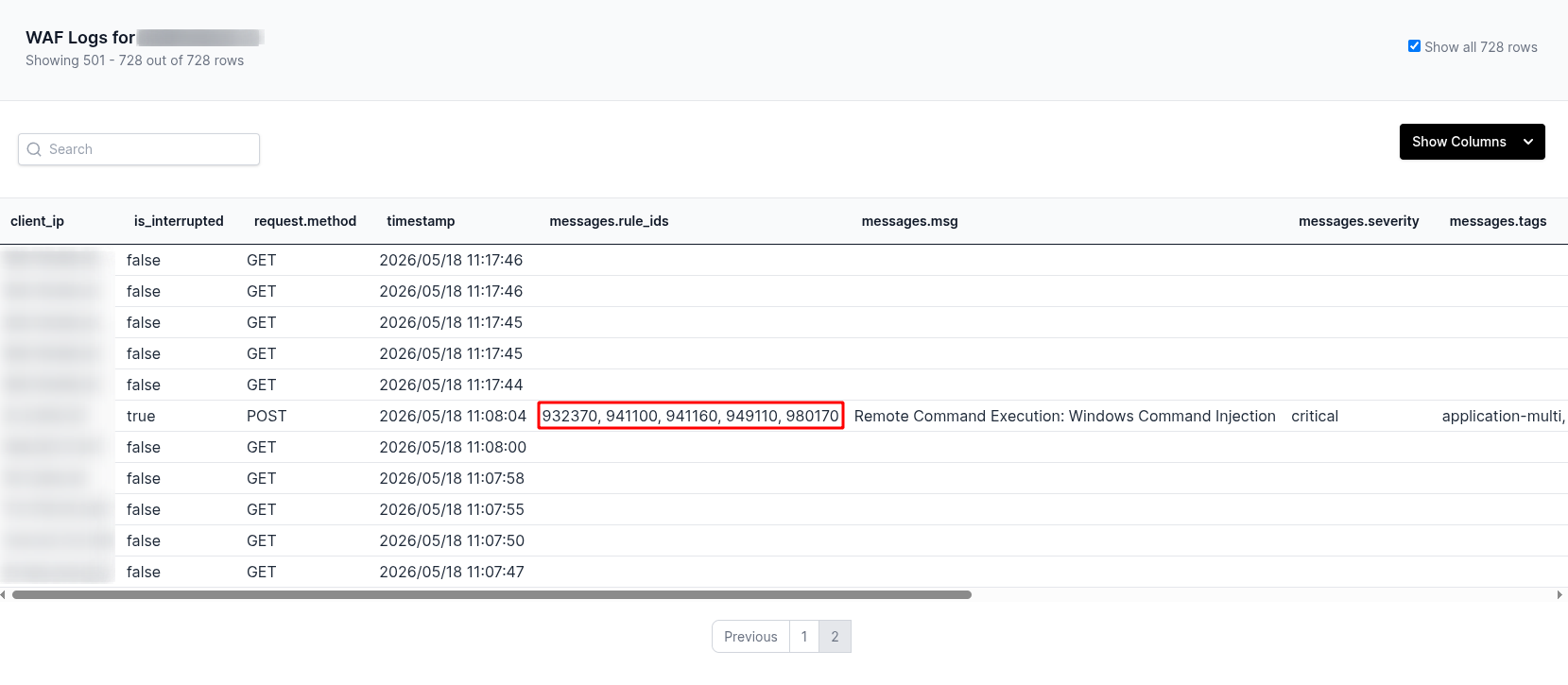
WAF Logs
WAF logs can be viewed by clicking the View Logs button for domain.
Reading the Logs
Coraza logs all checked requests, not just blocked ones. The key columns are:
is_interrupted: whether the request was blocked. true means blocked.
messages.rule_ids: the IDs of rules that fired, for example:
932370, 941100, 941160, 949110, 980170
These are the IDs you can paste into the Disable by ID field for that domain.
messages.tags — the tags associated with triggered rules, for example:
application-multi, language-shell, platform-windows, attack-rce, paranoia-level/1, OWASP_CRS, OWASP_CRS/ATTACK-RCE, capec/1000/152/248/88
When disabling by tag, use the attack category tags such as attack-rce or attack-xss. Avoid broad tags like OWASP_CRS or paranoia-level/1 as they would disable large portions of the ruleset.
Disabling rules by tag removes them globally for the entire domain. For false positives on specific pages (e.g. /wp-admin), disabling by ID is the safer approach as it can be scoped more precisely.
messages.msg — the human-readable reason the rule fired, for example:
Remote Command Execution: Windows Command Injection